
Platform modules — switch on only what you need
Five self-contained units on top of the same catalogue: e-commerce, a connection to your ERP, an AI editorial team for your blog, a photo studio and exports. You can add the E-shop and Blog as add-ons to any package.

An online shop built on PIM data
You manage payments, shipping, orders, coupons and the loyalty programme right where the products are created.
Payment gateways
Stripe, GoPay, Besteron and Payout with a single interface and encrypted keys — plus buying in instalments through Tatra banka for orders from €100 to €40,000.
Read the guideShipping and carriers
Packeta with a pickup point chosen on a map, DPD and GLS. Free shipping from an order value you set — in Storefront v2 also based on the price incl. VAT.
Read the guideOrder management
An order goes through its whole lifecycle, from receipt to delivery, with a payment history.
Read the guideDiscounts and coupons
Percentage and fixed discounts with usage limits and restrictions by date and product.
Read the guideLoyalty programme
A credit system with reward tiers, credit expiry and credits spent on a FIFO basis.
Read the guideCross-sell & upsell
Manual and dynamic recommendation rules with filters by category, brand and price.
Read the guideB2B sales in the EU
The shop verifies VAT numbers through VIES, applies the reverse charge and bills in several currencies with VAT by country of destination.
Custom domains and branding
Build several separate shops, each on its own domain, with a logo, an accent colour, a favicon and IDs for GTM and Facebook Pixel.
Read the guideVisual shop editor
Build the home page from sections by dragging them with the mouse, choose from 13 styles and see every change in a live preview. AI can prepare a design proposal too.
Read the guideShopping through AI agents
AI assistants find the catalogue on your domain, put together a cart via the UCP protocol and send the customer to your shop to complete the purchase.
Read the guideCatalogue mode and enquiries
A shop can show its range without a cart. Product enquiries and contact forms end up in the admin.
Read the guideNewsletter with a record of consent
Subscribers from the shop with proof of consent and a CSV export for Mailchimp, Ecomail, MailerLite or Brevo.
Read the guidePayment gateway and carrier integrations
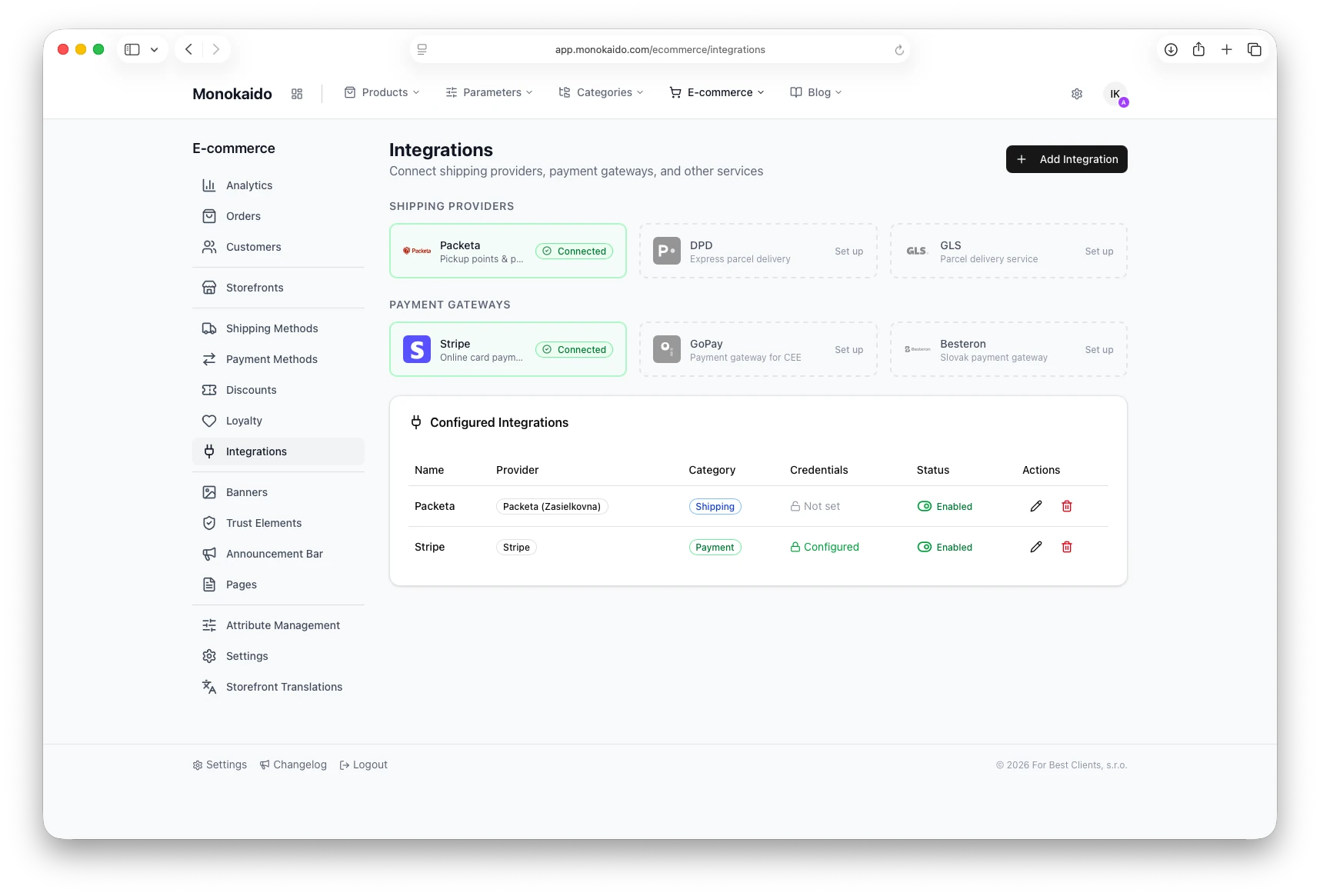
For each connector you can see its connection status, whether its credentials are filled in and whether it is switched on.
You can add the E-shop add-on to any package for €99 a month excl. VAT, on one invoice with the package. See pricing

A bridge between your PIM, ERP and online shop
Transfers to Grandus, Shoptet, WooCommerce, Cybersoft i6 and ANsystems send enriched products to wherever you sell. With Grandus and i6, orders travel too.
Grandus — both ways
We send the whole catalogue — products, photos, parameters and stock — to Grandus and re-sync it every 5 minutes. Orders go to the ERP, their statuses come back.
Read the guideCybersoft i6
Products, orders and payments in XML batches. Every exchange has an audit record and is repeated if there is an outage.
Read the guideShoptet and WooCommerce
Send AI-enriched content back to your shop. With WooCommerce you choose what is sent, and products from other suppliers are also created in the shop.
Read the guideANsystems
We write texts from Monokaido back to the ANsystems ERP — into the fields you specify. The rest of the product's data in the ERP stays untouched.
Read the guideStatuses and stock back to the PIM
When an order's status changes in the ERP, stock is released or reserved and the customer gets a notification. No risk of overselling.
Read the guideA live overview of transfers
You see the status of every transfer instantly. A failed webhook retries on its own, and ETag and caching keep the load low.
Read the guide
An autonomous AI editorial team
The authors write to their own schedule and you step in only when you want to.
Topic pool
Prepare topics with a priority, a description and internal and external links. You can add them in bulk or import them from a CSV file.
Read the guideAI authors with an identity of their own
Every author has a name, a photo, a bio, a personality (tone of voice) and a focus (e.g. “road cycling, bike servicing”). Two authors given the same topic write different articles.
Read the guideWriting frequency
Set how often each author writes: daily, every 3 days, weekly, fortnightly or monthly.
Read the guideBrand Voice
A list of recommended and banned expressions (green flags and red flags) defines how the brand speaks. It feeds into both the generation and the translation of every article.
Read the guideInternal linking
Links to already published articles are added to the topic — six at most and with no duplicates. It also works for topics the author came up with itself.
Read the guideTranslation straight after generation
Choose the target languages and every new article is translated with its HTML preserved.
Read the guideOne-click start
For each active author, one click puts an article in the queue immediately, without waiting for the scheduler.
Read the guideCategories and tags
Arrange categories in a hierarchy; tags are free-form and you don't need to define them in advance.
Read the guideAuthor pages
An author's profile has its own public page — readers and search engines alike can see who is behind the text.
Read the guideTipTap editor
Formatting, images, HTML and Markdown — everything is sanitised with DOMPurify. You choose the default article status: draft or published straight away.
Read the guideAnnouncement bar and banners
Give the bar an icon, a colour and a priority; banners have five positions, responsive images and scheduled display.
Read the guideAI logs and auditability
Every generation and translation is recorded: the type and source of the request, whether the brand voice was used and the reason for any failure.
Read the guideHow it works without human intervention
- 1Every 10 minutes the scheduler picks the authors who are “due” — either they have never written yet, or the set interval has passed since their last article.
- 2It assigns the author a topic from the pool — the one with the highest priority first, then the oldest. If the pool is empty, the author derives a topic from its focus.
- 3The author writes the article in its own tone, in the brand voice and with links to texts already published.
- 4The finished text is translated into the chosen languages and filed under the category and tags from the topic.
Topic lifecycle
pending → assigned → in_progress → completed. On completion, a link to the article it produced is shown.
Blog steps in Flows
create_blog_topic, generate_blog_article and translate_blog_article. Translation is idempotent — running it again does not create a second translation of the same article, so you can run the step regularly.
You can add the Blog add-on to any package for €39 a month excl. VAT. See pricing

Product photos and videos without a studio
A product photo becomes a lifestyle scene, a short video or a shot with a transparent background.
Scene generation
We place the product in a lifestyle scene using Clipdrop, OpenAI, Higgsfield or Gemini.
Read the guideProduct videos
Orbit, Zoom, Dolly, Pan and Static presets in 1080p resolution, 2–15 seconds long.
Read the guideBackground colour replacement
It takes two steps: we remove the original background and add the colour you choose.
Read the guideBulk processing
Select the products and the queue processes them five at a time. You can see how far the processing has got and stop it at any time.
Read the guidePhoto Studio is included in the M, L, Concierge and Prime packages. See pricing

Feeds, an API and scheduled exports
You can download the same data as a one-off, send it in regular feeds or let other systems request it through the API.
XML feeds
Google Merchant Center and the Facebook catalogue with custom fields from parameters, the price comparison sites Árukereső and Árgép, and the shop's sitemap.
Read the guideUnit price
For goods sold by the package (m², running metre, kg, litre), the Google feed also states the package content — Google then shows the unit price the EU requires.
Read the guideRecipient's categories
Match your categories to the price comparison site's tree and subcategories inherit the mapping. For Árukereső and Árgép you can also filter by product condition.
Read the guideCSV and Excel
Download parameter templates as XLSX or CSV, edit them in Excel and upload them again. You can also export categories, parameter values and customers to CSV.
Read the guideAPI keys
You can restrict a key to specific language versions, and the overview shows how many calls from its limit it has already used.
Read the guideScheduled generation
The feed is regenerated on a schedule — every 4 hours by default — and the recipient downloads it from a permanent address. The “Generate Now” button refreshes it immediately.
Read the guideConnectors for shops and ERPs
We send the catalogue to Grandus, Shoptet, WooCommerce, Cybersoft i6 and ANsystems — you'll find the details in the ERP and transfers section.
Read the guideProduct feed exports and API access are included in the M, L, Concierge and Prime packages. See pricing
Let's try it on your own catalogue
We'll walk through your feeds, categories and parameters live.