
From a product to an Instagram post in a few seconds
Monokaido turns a product photo into an image in your branding, AI writes the text to go with it, and you publish the post on Instagram or Facebook straight from the product detail. No designer and no retyping of data.
The image and the text are ready — you just confirm
The image, in 4:5 format (1080 × 1350 px), has the product photo, the name, the brand, your shop's logo and a line in the accent colour. The photo is darkened at the bottom so that the text stays readable even on a white background.
- Choose the product photo, the title and the subtitle — the preview is redrawn after every change
- Text of up to 2,200 characters and at most 30 hashtags: the window enforces Instagram's limits for you
- You'll find every text generation in the AI logs
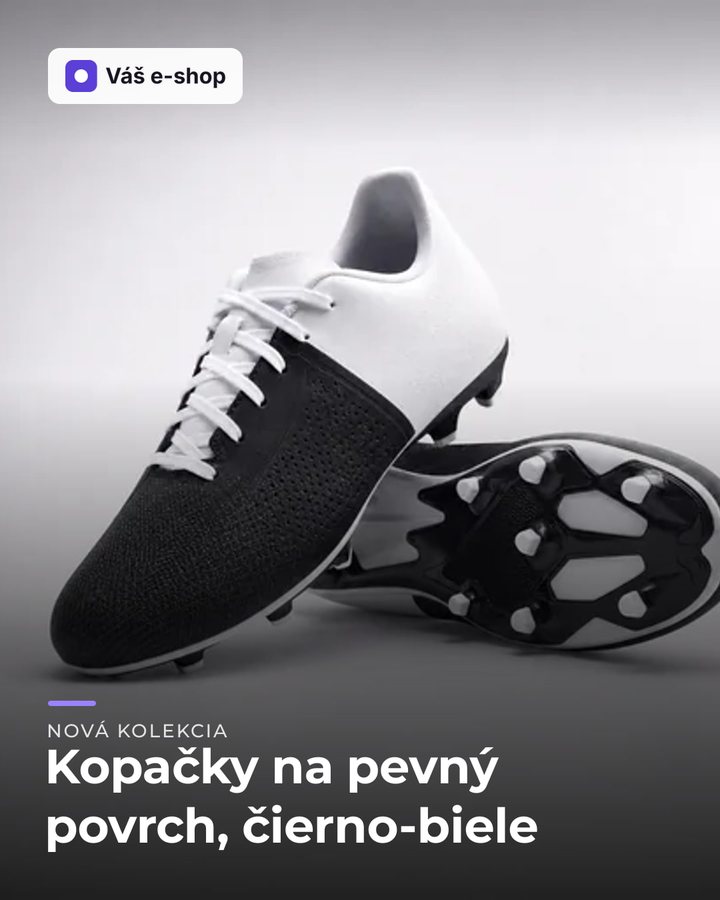
your.shop Firm ground, sure footing. Football boots with a synthetic leather upper and a sole for hard pitches — a black-and-white classic that goes with any kit. #footballboots #football #newcollection
Instagram post
4:5 format · 1080 × 1350 px
Post text · your brand voice
Firm ground, sure footing. Football boots with a synthetic leather upper and a sole for hard pitches — a black-and-white classic that goes with any kit.
#footballboots #football #newcollection

Four steps, no graphics software
Everything a post needs is already in the catalogue — the photos, the name, the brand and the parameters. Monokaido just puts them together.
- 01
Open a product
In the ⋯ menu next to the Edit product button, choose Instagram post or Facebook post.
- 02
The image is ready
The product photo becomes an image with the name, the brand and your shop's logo — in the right format for the network.
- 03
AI writes the text
The post text in your brand voice, with hashtags on the last line. You can edit it however you like.
- 04
Publish
With one button, to your Page — or download the image and copy the text.
For Facebook, in a wide format
For Facebook the image is in 1.91:1 format (1200 × 630 px) — the product photo on the right, the title and your shop's logo on the left. The post text has its own prompt, so it can be longer and more casual than on Instagram.
- The same product, the same data — a different format and a different text for each network
- Choose the photo from the product's switched-on photos; the main one is the default
- The logo is the light version from your shop's settings


AI writes in your voice — and makes nothing up
The text follows the brand voice you have set for the whole catalogue, and the prompts you adjust yourself.
Extra instructions
For a single post, add what applies only now — a running promotion, for example. AI does not invent prices, discounts or sizes that the product does not have.
Read the guideCustom prompts
Edit the instructions for Instagram and Facebook in the settings — the number of hashtags, the tone, what to mention. The language and the ban on invented facts always stay on.
Read the guidePost history
On the product you can see what was published and when. If the connection to Meta drops only after sending, the post is marked Uncertain and the next attempt asks first.
Read the guideSharing from your phone
On a phone there is an extra Share button, which opens the Instagram or Facebook app with the image and the text already in it.
Read the guide
Your own Page, your own token
To publish directly, all you need to do is connect your Facebook Page in the settings. Until the connection is set up, the Publish button is not shown — downloading and copying always work.
Settings → Social media
- All you need is the Page ID and a system user token from your Meta Business Suite
- When you save, we verify it directly with Meta; an invalid token is not stored
- It is stored encrypted and is never shown again
- Instagram posts are published through the professional account linked to your Facebook Page
We'll prepare the first post from your product
On a demo we'll pick a product from your catalogue and show you the image, the text and the publishing.