
An online shop whose look you put together yourself
Drag the home page sections into place, pick a style in one click and see every change in a live preview of your real shop with your catalogue. No developer needed.

The whole shop on one screen
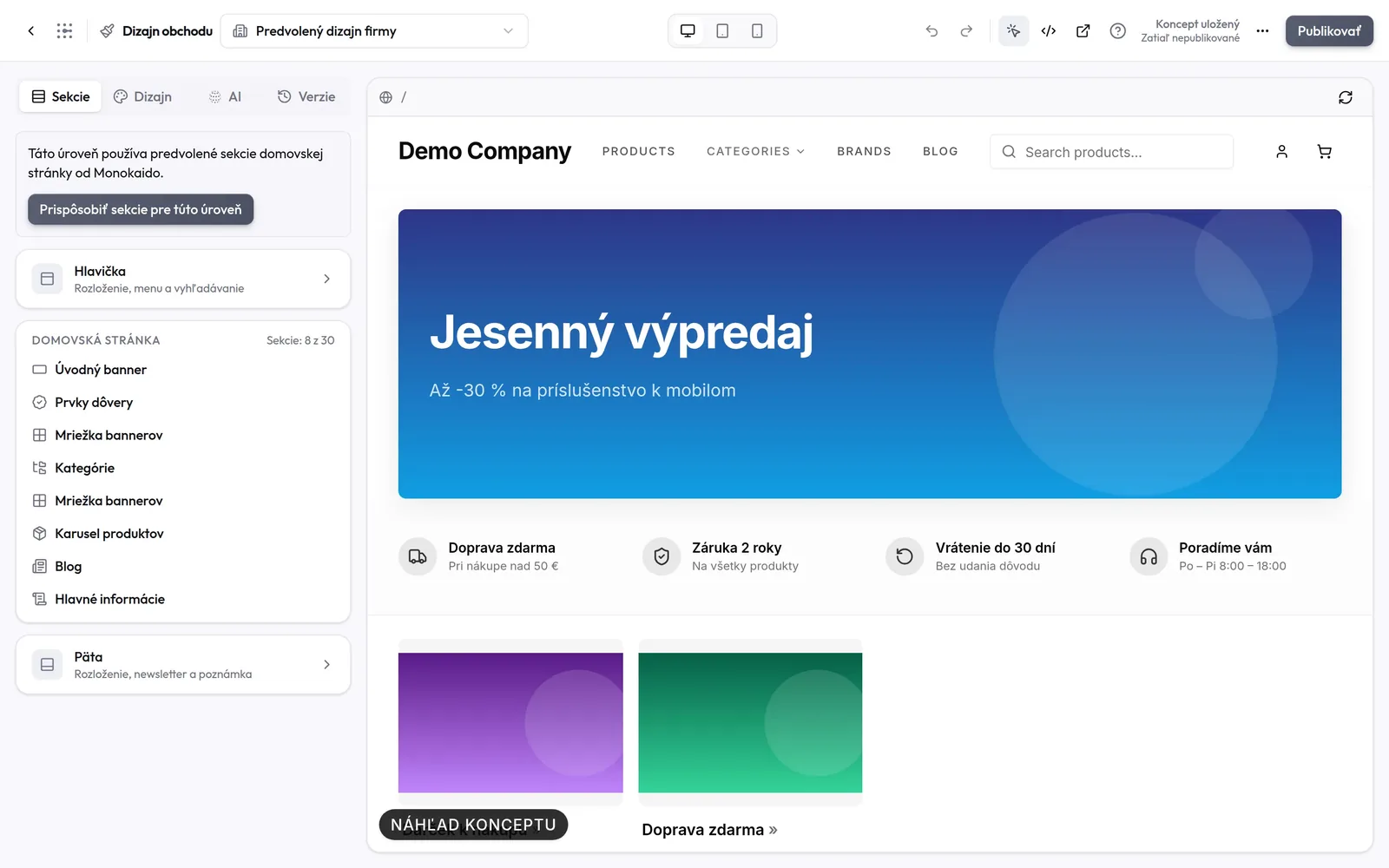
On the left, the section tree and the settings; on the right, the shop exactly as a customer will see it. The header, sections and footer are all edited in one place.
Drag-and-drop sections
Build the home page from 12 section types — banners, categories, product carousels, text, a newsletter sign-up, the blog or a contact form. A page can hold up to 30 of them.
Read the guideClick right in the preview
Your real shop, with your catalogue, runs next to the settings. Click a section in the preview and its settings open.
Read the guideDesktop, tablet and mobile
Switch the preview to tablet or mobile width, and choose for each section whether it shows on desktop, on mobile or everywhere.
Read the guideDraft, publishing and versions
Changes are saved to a draft, and customers see them only once you publish. Restore an older version in one click, or undo a step with Ctrl+Z.
Read the guide
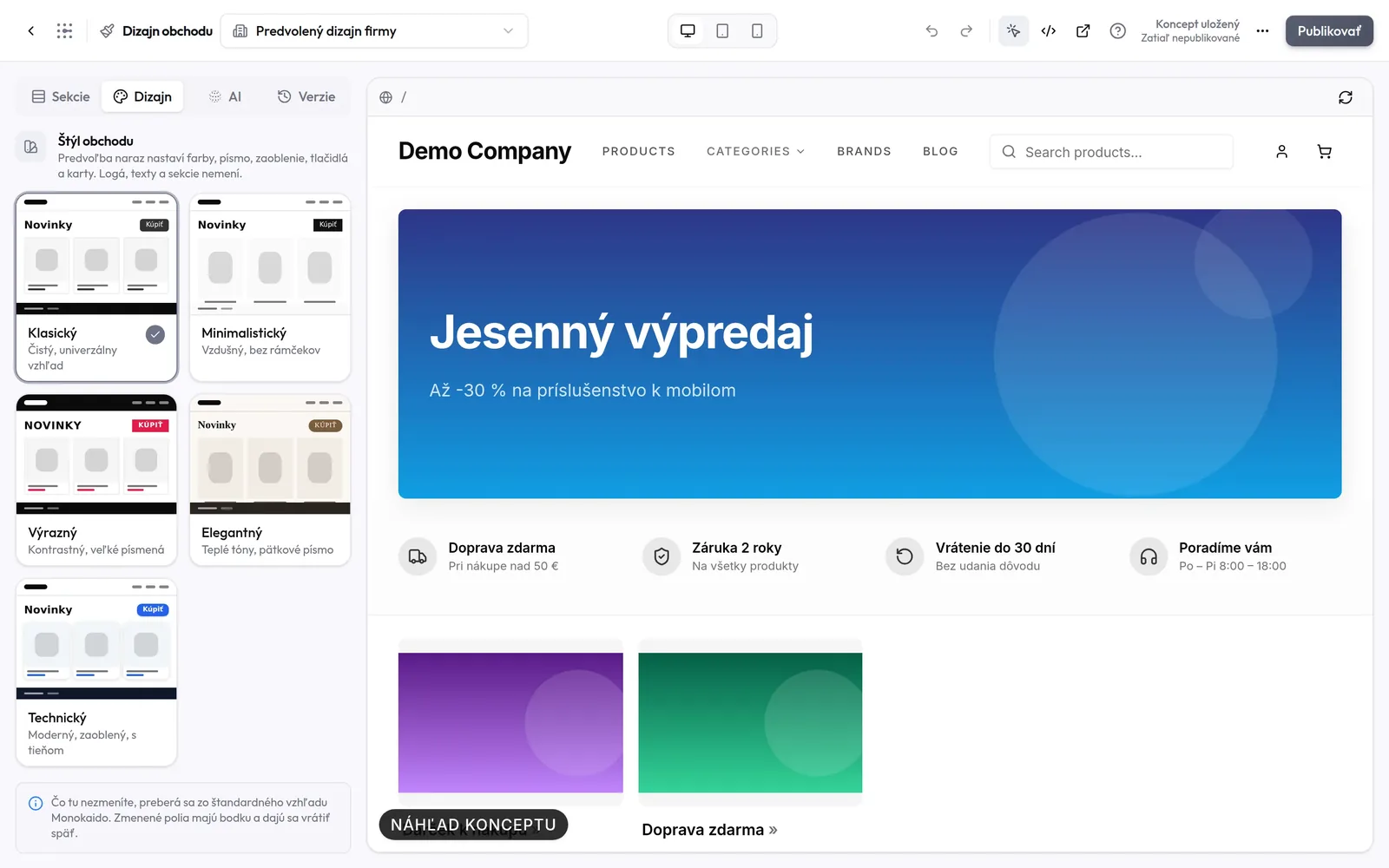
13 one-click shop styles
A preset sets colours, fonts, corners, buttons and product cards in one go. It leaves logos, texts and sections alone — and nothing changes on an existing shop until you publish the style.
- New inBuy
Classic
- New inBuy
Minimal
- New inBuy
Bold
- New inBuy
Elegant
- New inBuy
Tech
- New inBuy
Noir
- New inBuy
Fashion
- New inBuy
Natural
- New inBuy
Playful
- New inBuy
Sport
- New inBuy
Soft
- New inBuy
Nordic
- New inBuy
Vintage
Fine-tune every pixel
Set the corner radius of inputs, cards, banners and the Sale and New badges, the buttons (radius, font weight, capitals, shadow) and the border and shadow of the product card with a slider — the preview changes instantly.
- 10 fonts and a colour palette of your own for the header, content and footer
- Every changed value carries a dot, and one click resets it to the original
- A product grid or carousel, and the layout of the header and footer

A ready-made home page layout in one click
Five layouts for different types of shop. A layout replaces the list of sections, you can undo the change, and text and image sections appear in the shop only once you fill them in.
Standard
Banners, categories, new arrivals and the blog
Showcase
A large banner, a product grid, categories and an image with text
Catalogue
Many categories and banners for a wide range
Brand story
A full-screen banner, your brand's story and selected products
Simple
A banner and a product grid — nothing more
Describe the look, AI proposes the design
Write what kind of shop you want — for example “an elegant dark design with gold accents”. Monokaido AI prepares a proposal that you review before you apply it: you see which settings change and how many there are.
- A proposal goes through the same validation as manual edits
- Undo an applied proposal in a single step
- Works with Monokaido AI and with your own provider key
Proposal from Monokaido AI
The proposal changes these settings
A shop that sells by the metre and by enquiry
Flooring, wall tiles or fabrics are sold in packages, but customers think in m². The shop shows the price per unit, the package content and how much the customer is actually buying — and a calculator converts the area needed into whole packages.
- We take the unit and package content from the supplier feed — the options appear only when your products have them
- Below the Add to cart button you can add a box with an enquiry form, for example “Get a better price”
- The cart and stock always count whole packages, and every switch is off by default
Flooring › Vinyl
Vinyl flooring Natural Oak, click
€15.29 / m²
Package 2.26 m² · €34.55
In stock
I need20 m²
= 9 packages (20.34 m²)
Want a better price?
For larger quantities we'll prepare a tailor-made quote.
Send an enquiry
Everything a modern shop needs
What the shop has gained in recent months — from catalogue mode and a newsletter with a record of consent to buying in instalments.
Catalogue mode
The shop shows its range but does not sell — the cart and the checkout disappear, and an enquiry form can take the place of the buy button.
Read the guideContact forms and enquiries
A product enquiry and a message from the contact section both end up in the admin — with the fields filled in, the product and the signed-in customer.
Read the guideNewsletter with a record of consent
Every subscriber comes with proof of consent: when, in which shop and what wording they saw. CSV export for Mailchimp, Ecomail, MailerLite or Brevo.
Read the guideFooter with your physical store
The address with a link to maps, contact details, opening hours and social media buttons — Facebook, Instagram, TikTok, YouTube, LinkedIn, Pinterest and X.
Read the guideBuying in instalments
Customers apply for a loan through Tatra banka on orders from €100 to €40,000. They see an indicative instalment below the product price and at the checkout.
Read the guidePre-orders
Customers can order a new model straight away, even before it is in stock. The “Pre-order” badge also shows the estimated delivery date.
Read the guideE-mails in your branding
Order confirmations carry your logo and accent colour, links lead to your domain and the text stays readable even in the dark mode of Gmail or Outlook.
Read the guideEditing a received order
Correct the customer, company details, addresses, shipping and payment — with Packeta you pick the pickup point right on the map.
Read the guideServer-side Google Tag Manager
The GTM container can load from your own tagging server instead of from Google. It works on the classic storefront and on Storefront v2.
Read the guide
One catalogue, as many shops as you need
Brands, markets, or B2B and B2C sales can each have a shop of their own. The catalogue, prices and stock remain one.
Company default design
Set the shared look once. Individual shops change only what should differ — the editor shows how many such deviations a shop has.
Multiple shops, custom domains
Each shop runs on its own domain with its own logo, accent colour and interface language. You can also translate the shop's texts with the help of AI.
Advanced mode for developers
Tailwind classes for the header, footer, product cards or individual sections, plus custom CSS. The classes are compiled right in the shop.
The classic storefront keeps running
Switch Storefront v2 on when you create a shop or in its settings. Shops on the classic storefront do not change unless you choose to.
The Storefront Builder is part of the E-shop add-on
You can add the E-shop add-on to any package for €99 per month excl. VAT — on one invoice with the package. It is free during the 7-day trial.
We'll show you a shop built on your catalogue
On the demo we'll go through the editor, the styles and publishing — right on your own products.