
The same product from three suppliers? One clean record.
Monokaido finds the same product in the feeds of different suppliers by GTIN (EAN), MPN or SKU, shows the differences value by value and merges them exactly the way you decide — one pair or a hundred at once. And if you get it wrong, you can undo the merge.
Five rules, each with its own confidence level
One click goes through the whole catalogue. A GTIN is globally unique, so it has the highest confidence; each supplier makes up its own variant SKUs, so those are compared only across suppliers.
- Detection changes nothing — it only fills the queue of suggestions
- Running it again does not create duplicate suggestions
- It skips linked and archived products
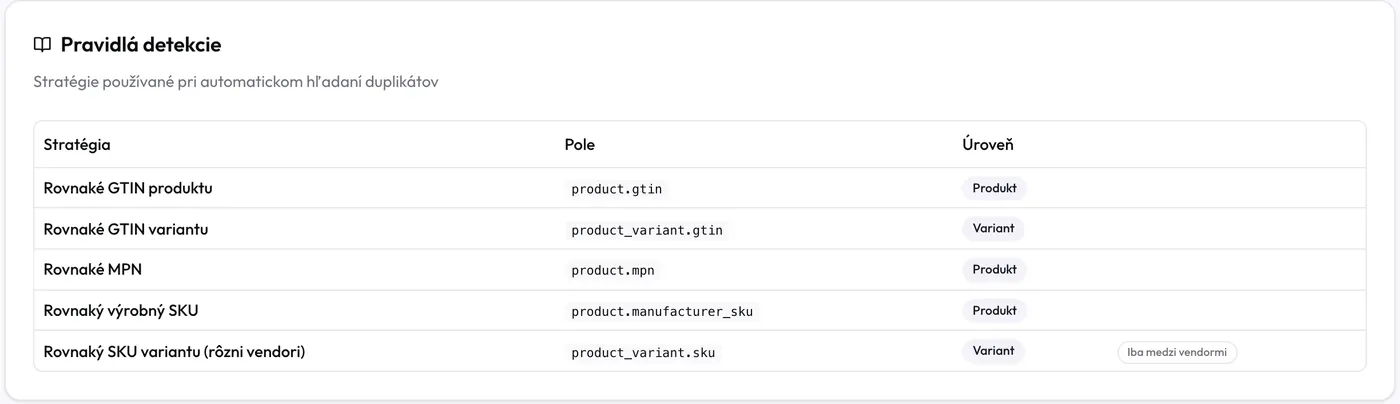
Match confidence
- Same product GTIN95%
- Same variant GTIN90%
- Same MPN80%
- Same manufacturer SKU75%
- Same variant SKU (across suppliers)60%
A GTIN from one supplier, an SKU from the other? We match those too.
Suppliers often put their identifiers in mismatched fields. In a manual search you choose from 11 fields on each side — code, external ID, GTIN, MPN, manufacturer SKU, name, and also the variant's SKU, GTIN or external ID.
- Side A is always the primary — the product that survives the merge
- When you search by name, the system warns you that a name is not an identifier
- The pairs found go to suggestions, or you link them straight away
Manual search
Side A · primary
Supplier
Supplier A
Comparison field
GTIN / EAN
Side B · secondary
Supplier
Supplier B
Comparison field
Variant SKU
Saved searches

You decide on every pair
Nothing happens on its own. For every pair you see which rule found it, on which value and with what confidence — and you choose one of three answers.
Reject
It is not a duplicate. The pair leaves the queue and detection will not suggest it again.
Link
It is the same product, but nothing is copied or archived. The second record simply stops appearing in the shop.
You can remove the link at any time
Compare and merge
Variants, images, parameters and categories move into one product exactly as you choose.
For each parameter, you choose whose value stays
Colour from one supplier, sizes from both, weight from the other. For each parameter you choose A, B, both or the default, and the values that will not stay are shown struck through before you merge.
- If the chosen product does not have the parameter, the choice does not apply — a merge never empties a parameter
- The system remembers the removed values, so the next feed sync does not bring them back
- You take the price from A or B, and the stock from A, B or both
Merging products
29" trail bike — 2 records from two suppliers
Price and stock: price from B, stock from A and B
Merge products
Hundreds of duplicates in one afternoon
With dozens of pairs, nobody clicks through each one separately. Set the steps up once and let them repeat — you see the result pair by pair.
Bulk merge finished
100 pairs · template “Supplier A ↔ B”
96
Merged
3
Skipped
1
Failed
The product was archived by another merge
A colleague has already resolved the suggestion
Up to 100 pairs at once
You set up the merge once on a sample pair and the system repeats the same steps on every pair you selected. The choices are stored by side A and B, not by specific products.
Read the guideA result for every pair
One bad pair does not stop the others. The run reports merged, skipped and failed pairs — each with the reason.
Read the guideMerge templates
Save a set-up you repeat for the same pair of suppliers as a template. Apply it to the next merge in one click and see how many times it has been used.
Read the guideSaved searches
Save the “supplier + field” pairing of a manual search. The next search is a single click, and sides A and B never get swapped again.
Read the guide
A merge you can truly undo
Undoing a merge is its true inverse, not just restoring the archived product. And if you have changed something by hand in the meantime, your newer decision wins.
“Undo merge” restores
- archived products in the state they were in — a published product comes back published
- the original field values, main image, prices and stock
- parameter values the merge removed
- duplicate links and suggestions the merge resolved
The merge log survives even an undo: who, when, which products and whether it was a bulk run.
Chained merges are undone newest first — the system enforces that itself.
We'll show you the duplicates in your catalogue
On a demo we'll run detection on your feeds and merge the first pairs — undo included.